AI Knowledge Assistant
Turn Your Organisational Knowledge Into Instant Answers.
Your most valuable information shouldn’t be buried in documents, folders, portals, and knowledge bases. An AI Knowledge Assistant gives your people a smarter way to find the information they need — simply by asking.
Your Organisation's Knowledge.
Ready When You Are.
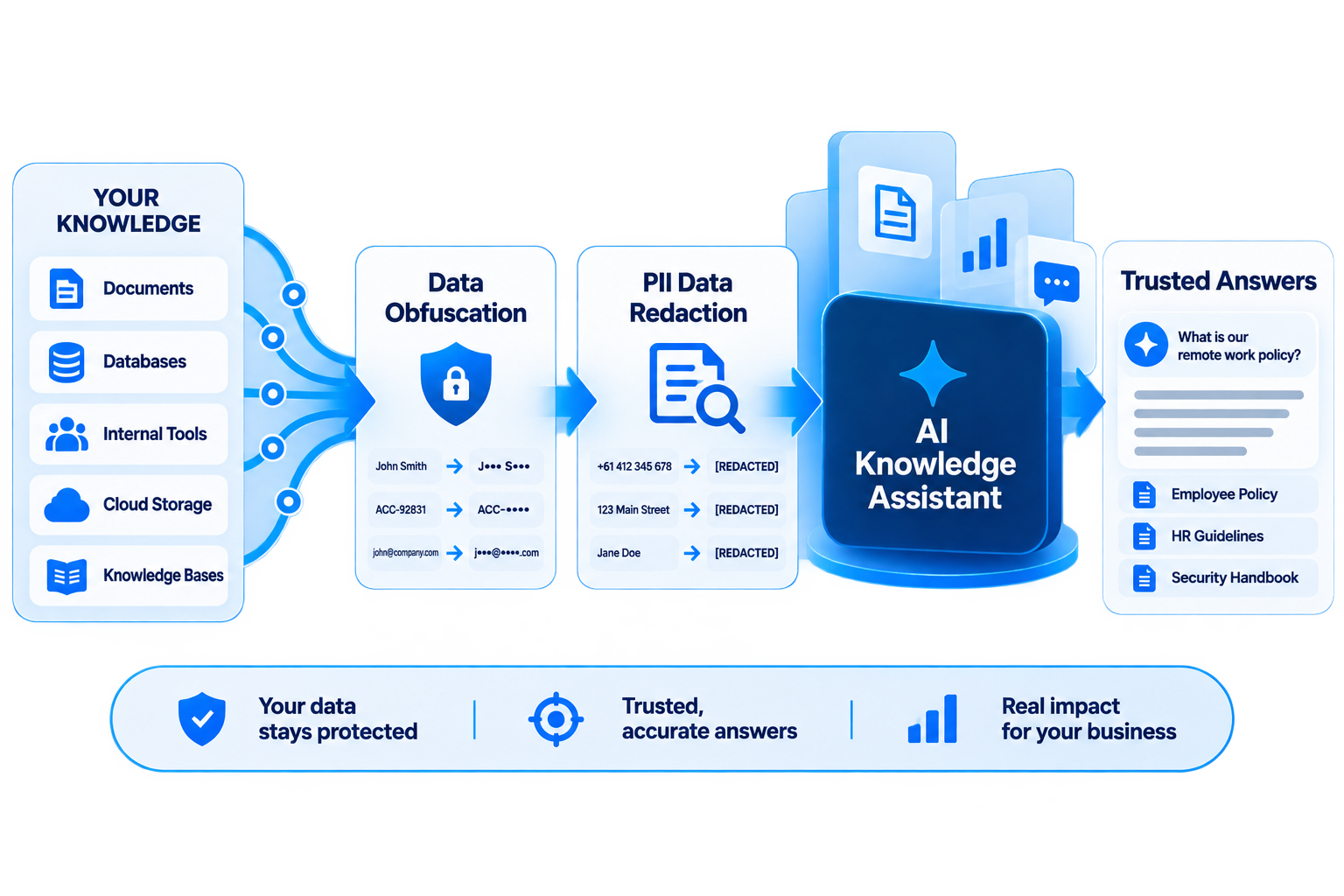
Tara brings your documents, policies, procedures and organisational knowledge together, helping your teams find clear, contextual answers without searching through multiple systems.
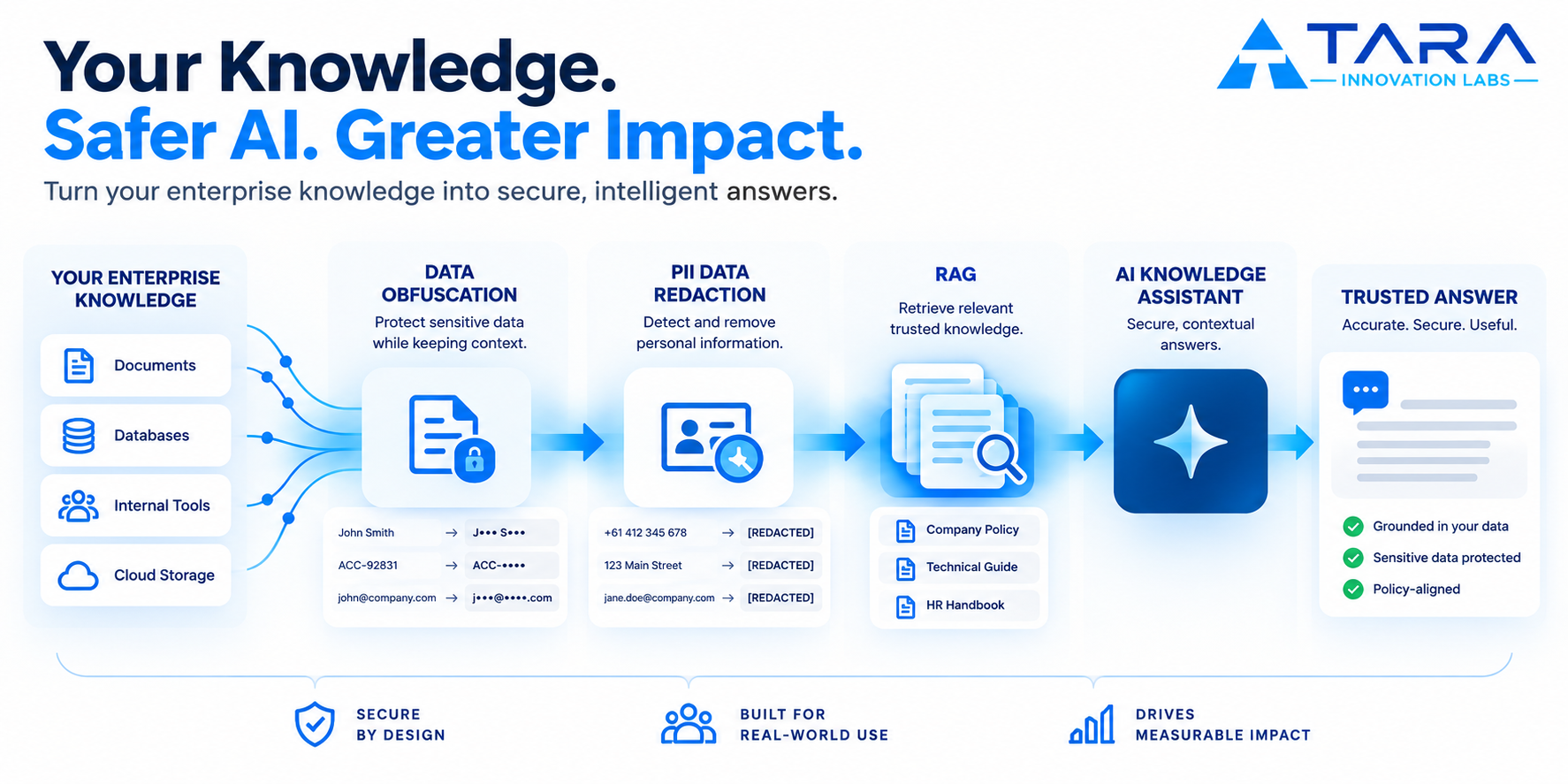
Intelligence with a security layer built in.
Tara combines RAG, data obfuscation and PII redaction to create a more controlled enterprise AI experience.
Your knowledge. Your controls. Your AI.
Tara helps organisations move from experimenting with AI to deploying it responsibly across real-world business environments.
Knowledge retrieved
Hover or tap a capability above to see it in action.
THE PROBLEM
Your Knowledge Is Scattered Across Five Places.
Same questions asked over and over
Info spread across five places
Finding a doc isn’t the same as understanding it
KEY CAPABILITIES
Built to Fit How Teams Actually Work.
Ask Naturally
No search syntax needed — just ask like you would a colleague.
Source-Grounded
Every answer traces back to the document it came from.
Role-Based Access
People only see what they're permitted to see.
Always Current
Answers reflect the latest version of your knowledge.
Works Across Formats
Documents, manuals, policies, and reports — all in one place.
The Problem
Your People Don't Have a Knowledge Problem. They Have an Access Problem.
The information they need may already exist. The problem is finding it.
Information Is Everywhere
Knowledge can be spread across documents, internal portals, shared drives, databases, manuals, websites, and team resources.
People Keep Asking the Same Questions
Teams repeatedly answer questions that have already been documented somewhere.
Important Information Gets Overlooked
Even when the right information exists, people may not know that it exists — or where to find it.
Searching Takes People Away From Work
Every unnecessary search creates interruption.
Complex Information Isn't Always Easy to Understand
Finding a document doesn't necessarily mean understanding it.
The Solution
A Smarter Way to Interact With Your Knowledge.
An AI Knowledge Assistant changes the experience from searching for information to asking for information.
Traditional
- Open
- Search
- Browse
- Read
- Compare
- Interpret
- Find the Answer
AI Knowledge Assistant
- Ask
- Discover
- Understand
- Act
Natural Questions
Users can ask questions in everyday language — for example, "What is the process for submitting this request?"
Relevant Knowledge
The assistant works with approved knowledge sources and identifies information relevant to the user's question.
Clearer Understanding
Present relevant information in a conversational and understandable format.
Faster Next Steps
Once users understand what they need to know, they can move forward with greater clarity.
Less time looking for answers. More time acting on them.
Business Value
What Changes When Knowledge Becomes Easier to Access?
Reduce Time Spent Searching
People spend less time hunting through folders and portals.
Reduce Repetitive Questions
Fewer of the same questions land on the same few people.
Improve Knowledge Accessibility
Existing information becomes easier to find and use.
Support Faster Decisions
People move forward with what they need to know, sooner.
Improve Employee Experience
Less friction between people and the information they need.
Make Existing Knowledge More Valuable
What you've already documented starts working harder.
You don’t necessarily need more information. You need to make the information you already have more useful.
How It Works
From Your Knowledge to Useful Answers — In Five Simple Steps.
01
Bring Your Knowledge Together
Connect the information that matters to your use case — documents, policies, manuals, reports, FAQs, guides and other approved knowledge sources.
02
Organise & Prepare the Information
The knowledge is prepared so relevant information can be discovered efficiently.
03
Ask Naturally
Users simply ask a question in the way they would ask another knowledgeable person.
04
Receive a Relevant Answer
The assistant identifies useful information and presents it in a clear conversational response.
05
Take Action With Confidence
Find the information. Understand it. Make the decision. Move forward.
Use Cases
One Knowledge Assistant. Many Possibilities.
Employees
Quickly find policies, procedures, internal guidelines and operational information.
“What is the process for requesting leave?”
Customer Support
Quickly locate product, service, policy and troubleshooting information.
“What should I tell the customer if this issue occurs?”
HR Teams
Access HR policies, employee guidelines, benefits information and procedures.
“What documents are required for this process?”
Operations
Access standard operating procedures and process documentation.
“What are the steps to complete this task?”
Sales Teams
Access product information, service details and supporting material.
“What are the key benefits of this service?”
Customers
Find relevant information without navigating complicated knowledge bases.
“Which option is right for my requirement?”
FAQ
Everything You Need to Know Before Getting Started.
It’s a conversational interface that helps people find and understand information from your organisation’s existing knowledge sources, by letting them ask questions instead of searching manually.
No. A generic chatbot answers from general knowledge. An AI Knowledge Assistant is built around your organisation’s own approved information, so its answers are grounded in what you actually have.
Documents, policies, procedures, manuals, reports, FAQs, product and service information, and other approved knowledge sources.
Not necessarily. The assistant is designed to work with knowledge you already have. Where gaps exist, additional content can be added over time.
Yes. Users can ask in everyday language, the way they would ask a knowledgeable colleague, rather than using specific search terms.
Where configured, responses can reference or link back to the underlying source material, so users can verify or explore further.
Yes. Access can be configured by role or group, so people only retrieve information they are permitted to see.
Yes. The assistant can be configured for internal use, customer-facing use, or both, depending on your requirements.
Knowledge sources can be updated on an ongoing basis, so the assistant’s understanding can reflect your current information over time.
No system can guarantee perfect accuracy in every case. The assistant is designed to work from your approved knowledge sources, and how much users should independently verify important answers depends on your use case.
If your people regularly struggle to find information that already exists, or repeatedly ask questions that are already documented somewhere, it’s worth exploring. Talk to us about your specific situation.
Your Knowledge Is Already Working. Make It Easier to Reach.
Turn scattered information into a more accessible, intelligent knowledge experience. Help your people spend less time searching, get answers faster, and make better use of the information your organisation already owns.